Review and Manage Scraped Pages
Review your scraped pages and choose which ones to keep or remove from your knowledge base.
Viewing discovered pages
| Step | Action |
|---|---|
| 1 | Go to Dashboard -> Data Sources |
| 2 | Click your website source |
| 3 | View the list of discovered pages |
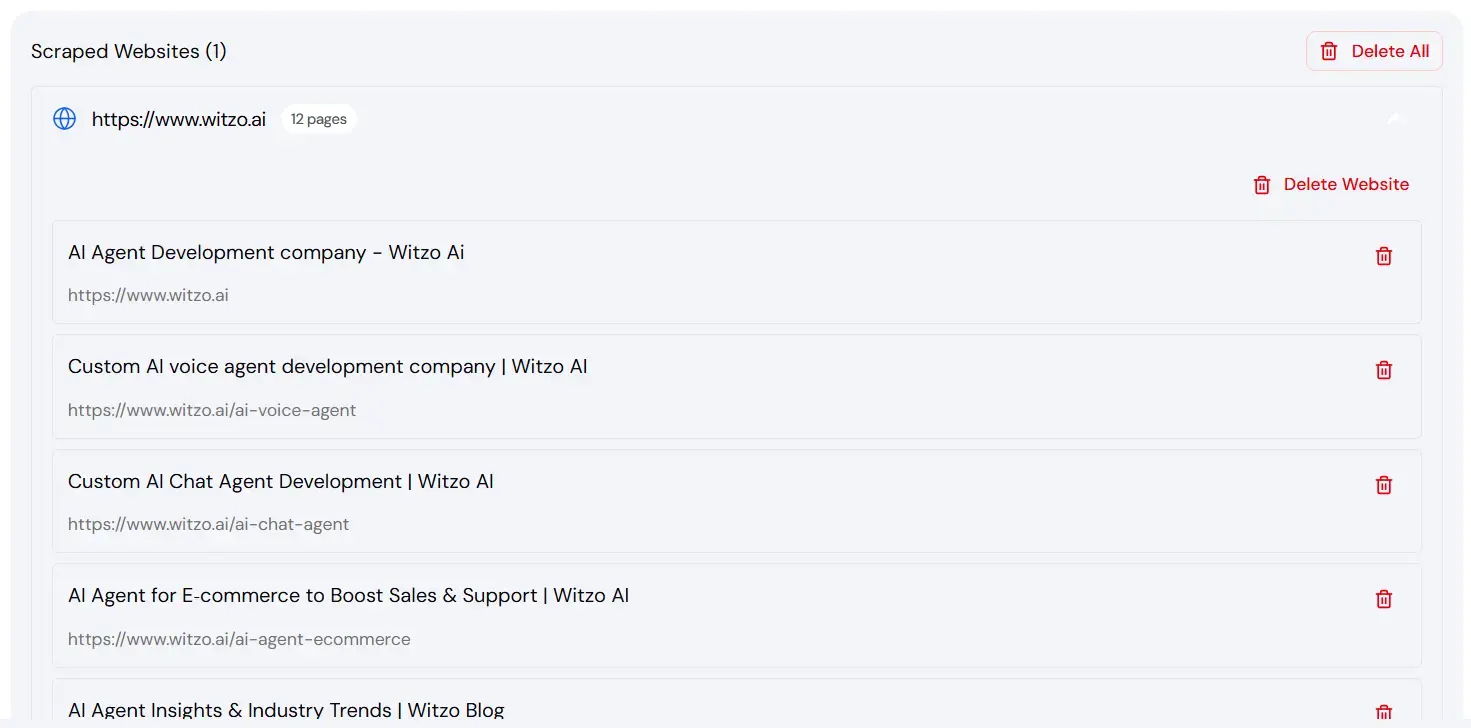
Each page listed is currently part of your training data.
Removing unwanted pages
| Step | Action |
|---|---|
| 1 | Select the page you want to remove |
| 2 | Click Delete |
| 3 | Confirm removal |
| 4 | Retrain the source |
Pages removed will no longer be used for AI responses.
Why excluding legal pages improves answers
Legal pages like:
- Privacy Policy
- Terms & Conditions
- Cookie Policy
contain repetitive legal language.
- This can introduce noise into AI answers.
- Removing them improves clarity and reduces irrelevant responses.
Retraining after removal
After removing pages:
| Step | Action |
|---|---|
| 1 | Click Retrain |
| 2 | Wait for processing to complete |
Retraining updates the indexed knowledge base.
Important Notes or Limitations
- Changes do not reflect immediately until retraining completes.