Viewing and Managing Leads
View, review, and update captured visitor leads directly from your dashboard for easy management.
Overview
When a visitor shares contact details through the widget or fallback lead form, Witzo stores that information in the Leads section. You can review the conversation context, update status, and track follow-ups from one place.
1. Open the Leads dashboard
Go to Dashboard → Leads
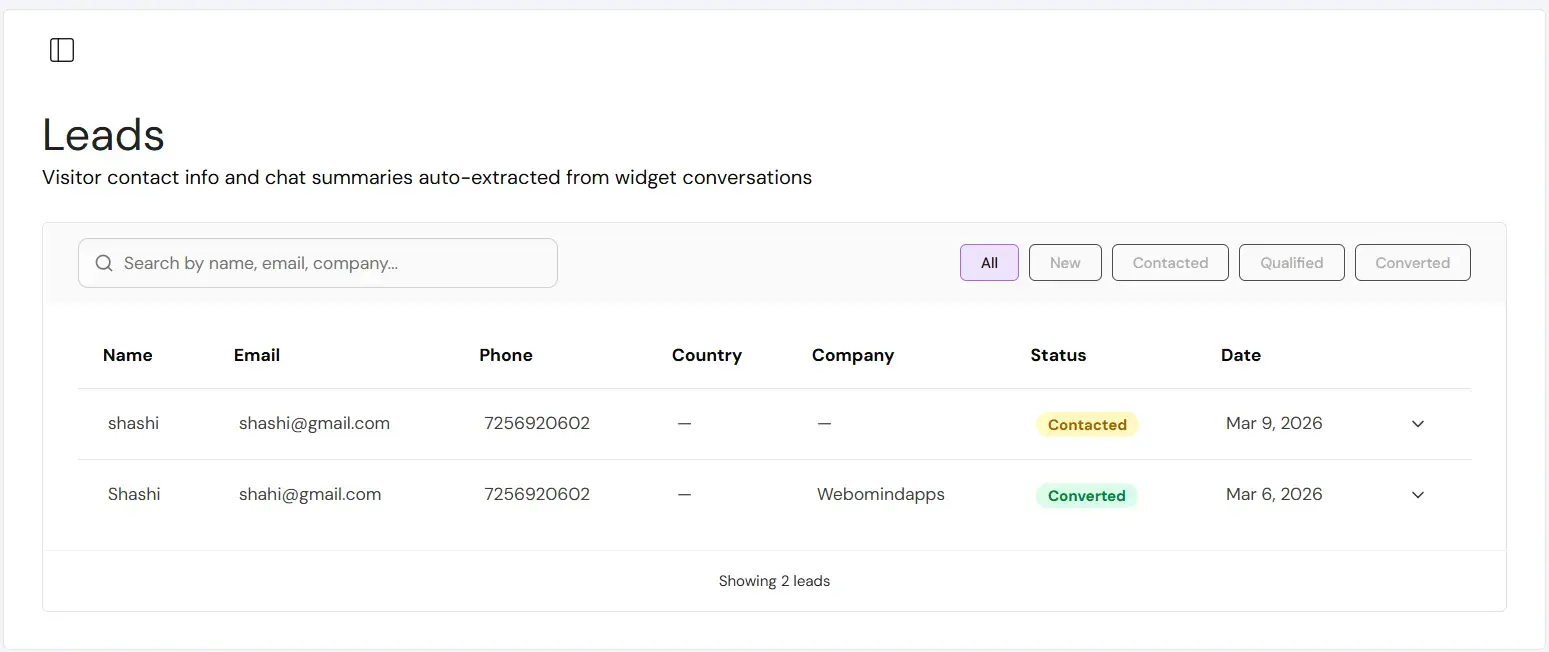
You will see a list of all captured leads with:
- Name
- Phone (if provided)
- Status
- Created date
2. Review Lead Fields
Click any lead to open detailed view.
You can view:
- Contact details
- Source (chat or fallback lead form)
- Conversation reference
- Follow-up status
Lead storage is plan-based.
| Free: | 3 leads |
|---|---|
| Basic: | 10 leads |
| Standard: | Unlimited |
| Enterprise: | Unlimited |
3. View Chat Summary
Each lead includes a short AI-generated chat summary.
This summary explains:
- Visitor intent
- Main question asked
- Product/service interest
It helps you understand context without reading the full conversation.
4. Update Lead Status
Each lead includes status tracking.
Common statuses:
- New
- Contacted
- Converted
Updating status helps your team track progress and avoid duplicate outreach.
- CSV or Excel export is not currently available.
- Deleting a lead permanently removes it from storage.
- Lead capture from fallback form is disabled on Free plan.
Plan Restriction: Fallback lead form is available on Basic, Standard and Enterprise only.